
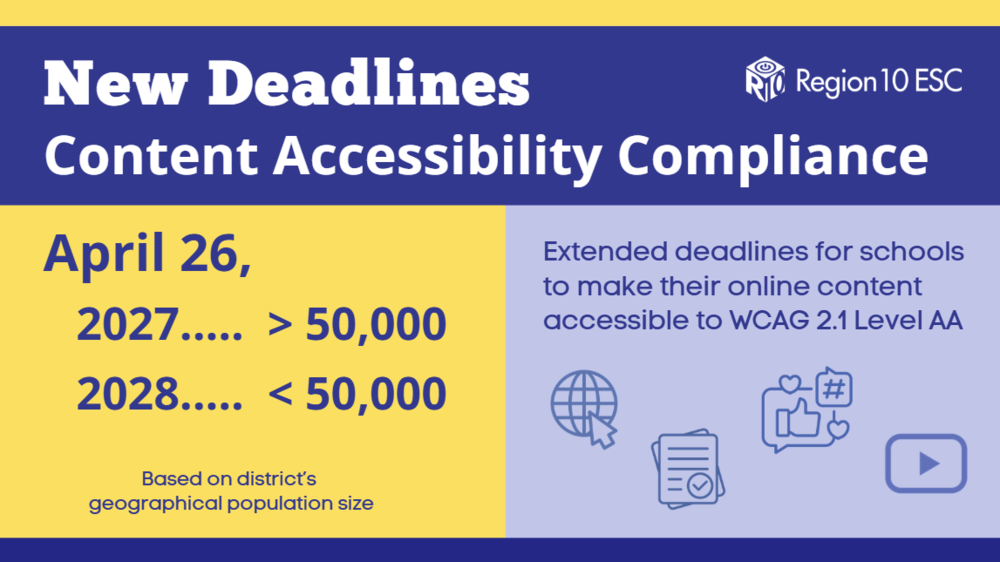
The Department of Justice published a final rule requiring state and local governments, including public school districts, to ensure their web content and mobile apps are accessible to people with disabilities. The rule mandates compliance with Web Content Accessibility Guidelines (WCAG) 2.1 Level AA standards by specific dates as follows. The official version was published in the Federal Register on April 24, 2024. Full document text for the final rule is document number 2024-07758 on the Federal Register website. Extension deadline information from the Federal Register.
DISCLAIMER: This information is provided as a courtesy from Region 10 ESC. We highly recommend you check with your district legal department for complete and final details.
Deadline Dates: Do not delay!
In general, school district geographical population size determines the deadline date** for compliance with the rule.
NOTE: On April 20, 2026, the DOJ extended the deadlines another year. The NEW deadlines are:
April 26, 2027: Districts with a geographical population size serving more than 50,000 people
April 26, 2028: Districts with a geographical population size serving fewer than 50,000 people
**Be sure to review your deadline with your district's legal counsel.
NOTE: These deadline extensions are being challenged by the National Federation of the Blind. But do not delay implementing your accessibility program - these laws are not new; accessibility laws have been in place for several decades.
Enforcement
The Department of Justice will oversee enforcement. Non-compliance can result in legal complaints, federal investigations, legally binding remediation agreements, litigation, increased remediation costs, and reputational harm.
What Must Be Compliant*
*Not an exhaustive list
Public-Facing Websites
All pages, online documents, and interactive elements on district websites.
Includes calendars, announcements, enrollment forms, and portals.
Videos (YouTube captions are not enough - these are not compliant)
Audio-only / Visual-only Content
Online Learning Management Systems
3rd Party Publisher Content (eBooks & Curriculum)
New Social Media Posts
Mobile Applications
Apps used by students, parents, and staff for communication, learning, or administration. Digital Instructional Materials
Online learning platforms, course content, and homework portals.
Online Exams / Quizzes
PDFs, presentations, and multimedia are posted for student use. Administrative and Public Service Content
Online payment systems, registration forms, and employment applications.
Any digital service provided to the public.
Exceptions (Review exceptions in actual legal rule with a lawyer)
Pre-existing Conventional Electronic Documents
Content posted by a third-party (i.e. message board where content is posted by a parent, for example, etc.)
Individualized Documents that are password protected
Pre-existing social media posts
Ask lawyer about 'Safe Harbor' clause (for very specific instances)
Regarding Archived Content
**This information is provided as a courtesy from Region 10 ESC. We highly recommend you check with your district legal department for complete and final details.
Archived content does not need to be made accessible — only if it meets all four required conditions (listed below) of the ADA Title II archive exemption.
Four Conditions that must be met for Archived Content
It was created before April 24, 2026 (the compliance deadline), or is a reproduction of physical media created before that date. --- AND ---
It is kept ONLY for reference, research, or recordkeeping. --- AND ---
It is not altered or updated after being archived. --- AND ---
It is stored in a clearly identified, dedicated archive area.
If any of these four criteria above are not met, the content must meet WCAG 2.1 AA.
NOTE:
“Old” content is not automatically archived.
Content still used in a current service, program, or activity must be made accessible, regardless of age.
If it is public-facing, it must be accessible, no matter how old it is.
If content is not stored in a dedicated archive area (i.e. the main website area), it must be accessible.
Even exempt archived content must be remediated if an individual requests it.
Location of Archived Content
The DOJ does not mandate a specific technical structure, but it does require that archived content be:
Clearly separated from active content
Clearly labeled as archived
Not mixed into normal navigation or current program pages
DOJ guidance explicitly states that public entities may:
Create separate pages or sections
Create separate archive areas or even separate archive sites
Compliance Checklist for School Districts
Text and Structure
Provide alt text for all images, charts, and graphics.
Use descriptive headings and maintain a logical reading order.
Ensure lists and tables are properly formatted for screen readers.
Navigation and Interaction
Hyperlinks
All functionality must be keyboard accessible (no mouse-only actions).
Include skip navigation links for long pages.
Ensure focus indicators are visible when tabbing through content.
Visual Design
Maintain a color contrast ratio of at least 4.5:1 for text and background colors.
Avoid using color alone to convey meaning (e.g., red for errors).
Allow text resizing up to 200% without loss of content or functionality.
Multimedia
Provide captions for all videos and transcripts for audio content.
Videos (YouTube captions are not enough)
Avoid auto-playing media; if unavoidable, include pause/stop controls.
Forms and Interactive Elements
Label all form fields clearly and associate labels programmatically.
Provide error messages and instructions for corrections.
Ensure time-limited activities have adjustable time settings.
Mobile Apps
Verify touch targets are large enough and properly spaced.
Ensure screen reader compatibility for all app elements.
Test with both iOS and Android accessibility tools.
Testing and Monitoring
Run automated accessibility checks (e.g., WAVE, Axe).
Conduct manual testing with screen readers (NVDA, JAWS).
Document compliance progress and remediation plans.
District Next Steps
Conduct an inventory of digital assets to identify accessibility gaps.
Develop and implement an accessibility roadmap and policies.
Provide accessibility training for staff. (Region 10 can assist with training)
Incorporate accessibility requirements into procurement contracts with third-party vendors (VPAT, VADSIR).
Prioritize remediation of issues, and, in cases where digital material cannot be made accessible, provide a conforming alternative version, with approval from the Disability Rights Office.
Suggested High-Priority Items to Remediate First
Content Type | Why High Priority | Action Steps |
|---|---|---|
Enrollment Forms | Essential to student access | Add labels, error handling, keyboard nav |
Instructional PDFs | Frequently used for coursework | Convert to an accessible format or use Optical Character Recognition (OCR) |
Videos & Multimedia | Critical for learning | Add captions and transcripts |
Homepage & Menus | Primary navigation for all users | Ensure keyboard access and proper color contrast |
Mobile Apps | Increasingly used for communication | Test with screen readers and adjust the user interface |
Accessibility Training Assistance
Region 10 ESC offers online, Zoom, and in-person accessibility training with remediation practice designed to target the most essential accessibility knowledge for educational content creators while supporting diverse learning preferences.
Districts, charters, and ESCs may purchase our Content Accessibility Training Package through the Region 10 eContracts system. Heavily discounted pricing based on full-time staff count makes organization-wide accessibility training an affordable and scalable solution.
For more information on accessibility training or our training package, please contact Denise Barker (denise.barker@region10.org).
Scan the QR code below to sign up for our Region 10 Accessibility Newsletter, which contains class registration links and more.

More Information & Sources
Final Rule Text - Federal Register Document number 2024-07758
Census.gov Programs-Surveys - SAIPE
Americans with Disabilities Act Title II Regulations Supplementary Information